Appointment types: rehearsal, performance, event, other
What the four appointment types are for, which colour each one has in the web calendar and why the colour means something else in the app.
Web + app
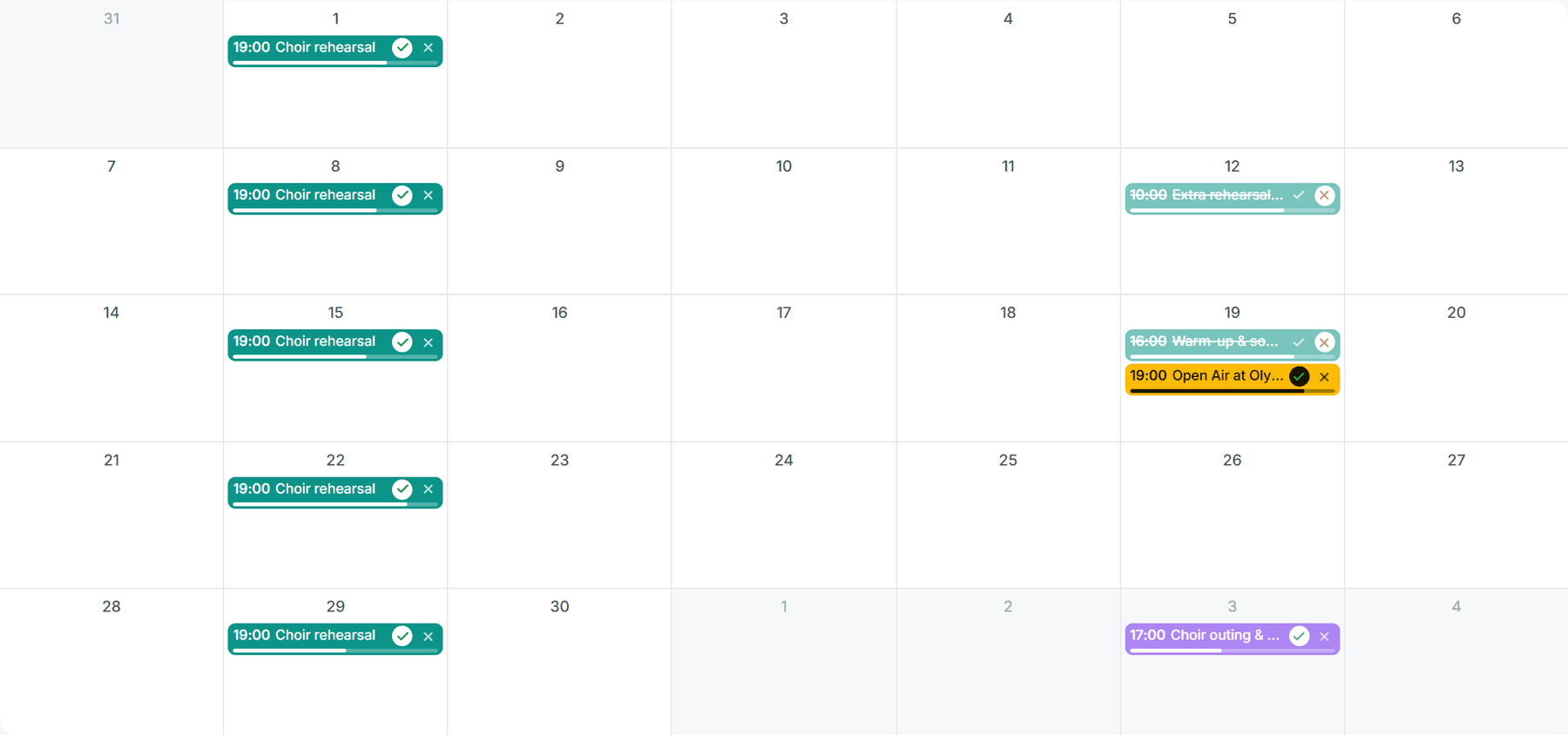
When you create an appointment you choose an appointment type. It classifies the appointment, gives it its colour in the web calendar and can be used for filtering. cori offers four types to choose from, plus the birthdays that cori adds by itself. This guide explains what each type is meant for and how it appears in the calendar.
The type is set by whoever creates the appointment: the choir leadership and admins. The choice is available on the web (as coloured chips in the appointment form) and in the mobile app (as a select field) alike.
The four appointment types
- Rehearsal: the regular choir rehearsal. The default type for new appointments.
- Performance: concerts and public appearances. On the detail page and on the "Next Appointment" card on the web, a performance also carries a small star.
- Event: other happenings around the choir, such as a choir outing or a party.
- Other: anything that doesn't fit into any of the other types.
The type changes nothing about an appointment's location, attendance or repetition. It does, however, affect the wording of the notification: a new performance is announced to the members as "New performance", an event as "New event", rehearsal and other as "New appointment".
The colours in the web calendar
In the month grid of the web app, every appointment carries the colour of its type:
| Type | Colour |
|---|---|
| Rehearsal | Turquoise |
| Performance | Yellow |
| Event | Purple |
| Other | Grey |
The filter chips above the grid and the chip on an appointment's detail page carry the same colours. That makes the chips the legend at the same time: in the top right you read off which colour stands for which type.
Two things override the colour of the type:
- Cancelled appointments appear red and struck through, whatever type they have. More on this under Cancelling an appointment.
- Appointments you have declined keep their colour, but are shown paler and struck through.
The mobile app colours appointments on a different principle: there the colour of an appointment card shows your own attendance response. Yellow means "you have accepted", dark blue-grey "you have declined", red "the appointment is cancelled", neutral "no answer yet". In the app you recognise the appointment type by the text label, not by the colour.
Filtering by type
You can narrow the calendar down to individual types, for example to show only performances. On both platforms there are filter chips for this above the calendar or the appointment list. More on this under Filtering your appointments.
Birthdays
cori shows the birthdays of your choir members in the calendar automatically, as an appointment type of its own called "Birthday". You don't create these entries yourself: cori works them out from the date of birth that members have stored in their profile. Without a stored date of birth, nobody appears. Birthdays have no attendance and cannot be edited or cancelled.
In the web app, birthdays do not show up in the calendar.
And next?
- Create appointments and choose the type: Creating appointments and rehearsals
- Filter by type and more: Filtering your appointments
- Understand responses: Setting and tracking attendance
Still need help?
Can’t find what you’re looking for? Send us a message and our team will get back to you.
Contact support